 100% Free
Traffic Light Diagram
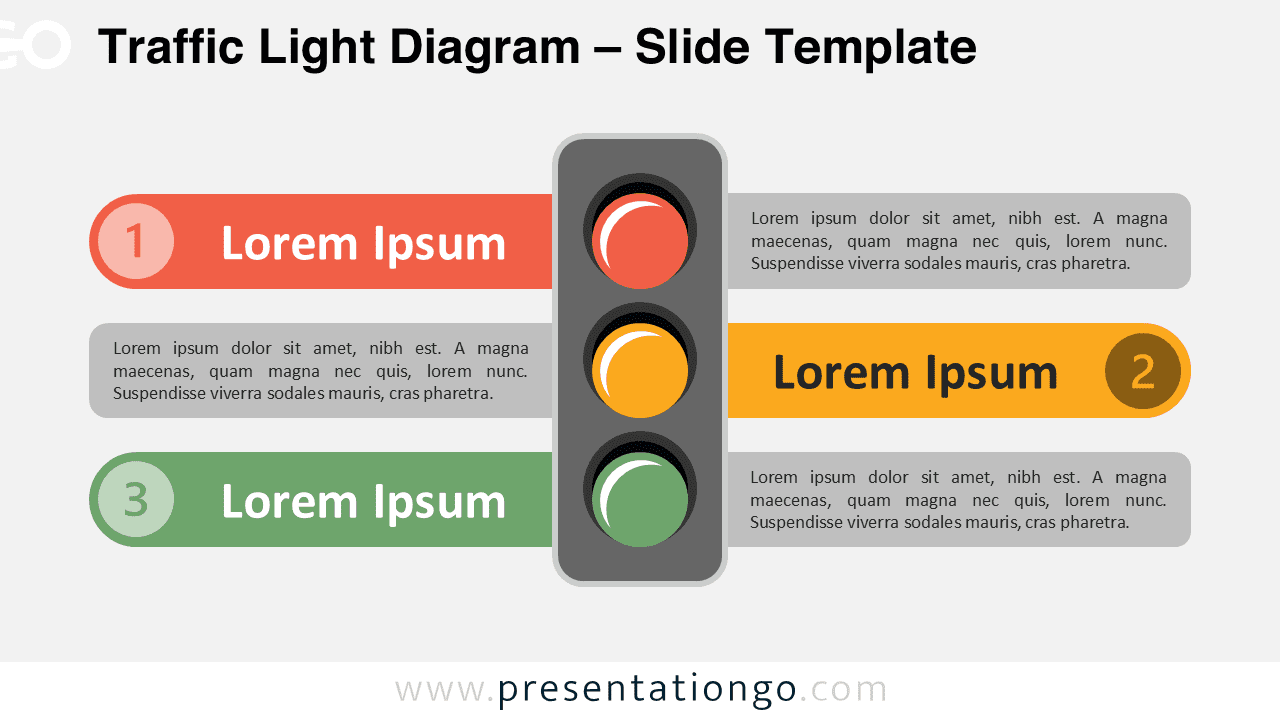
Download this free Traffic Light Diagram for PowerPoint and Google Slides. Use 3 stoplight signals to visualize priorities or processes.
Template Details
The Traffic Light Diagram provides a clear visual framework for presenting three-step processes using universally recognized signal colors, designed specifically for PowerPoint and Google Slides presentations. Centered around a vertical traffic light graphic, this infographic aligns three horizontal segments with corresponding lights—red at the top, yellow in the middle, and green at the bottom. Each light anchors a bar extending laterally: the red and yellow segments to the left, and the green to the right. These bars include a circular number marker and a text field for titles, followed by a content area for detailed descriptions. The layout is mirrored and symmetrical, enhancing visual balance while guiding the viewer’s gaze through the sequence. In presentations, traffic light diagrams serve as strong metaphors for processes involving caution, decision-making, or sequential actions. Red signals indicate stopping points or risks, yellow for evaluations or midpoints, and green for progress or positive outcomes. This specific layout is ideal for illustrating stages like risk levels, project phases, compliance status, or strategic checkpoints. For instance, project managers might use it to communicate task readiness, while educators can visualize levels of understanding. Download this three-part visual metaphor to highlight critical checkpoints or stage-based decisions in your next presentation.
Template Features
- 2 unique slides
- Options for both light and dark themes
- Pre-populated with icons and text placeholders
- Fully customizable shapes for complete control
- Available in both Standard (4:3) and Widescreen (16:9) ratios
- Offered in both PowerPoint PPTX and Google Slides formats
- Source
- PresentationGo
- Format
- pptx
- File size
- 101 KB
- Downloads
- 0
- Slides
- 2
- Aspect Ratio
- 16:9
Author / Copyright:PresentationGo
Original source:PresentationGo original