 100% 無料
Four-Loop Clover
Download this four-part Four-Loop Clover template for PowerPoint & Google Slides to showcase workflows and key ideas.
テンプレートの詳細
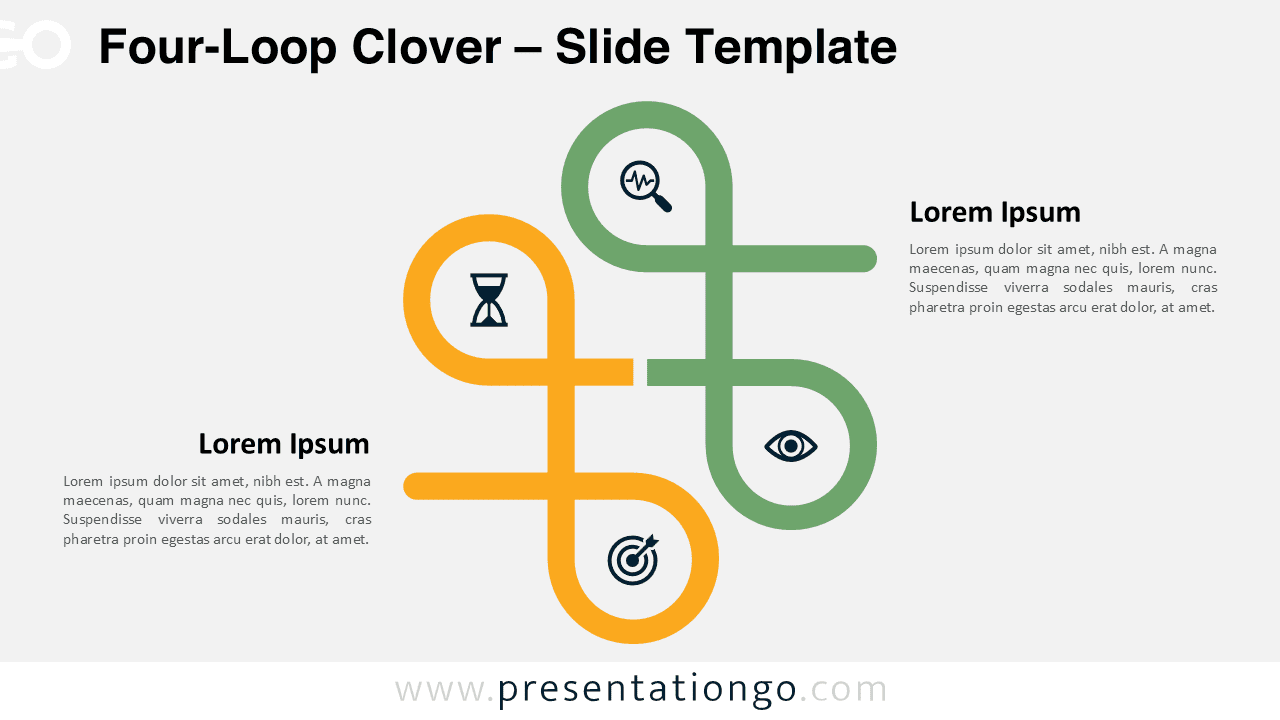
The Four-Loop Clover represents a dynamic four-step diagram for PowerPoint and Google Slides that illustrates interconnected processes through an elegant, flowing design. The diagram consists of two flowing shapes that connect to create four distinct loops across the slide. Starting from the left, each loop flows naturally into the next, creating a continuous horizontal progression. The balanced spacing between elements maintains a clear visual pathway while providing ample room for content within each loop. This intuitive flow diagram works perfectly for presentations showing progressive stages, sequential processes, or step-by-step methodologies. Sales teams can map customer journeys, trainers can outline learning progressions, and managers can illustrate project phases. The horizontal layout naturally guides audiences through each stage, making complex sequences easy to follow.. The template includes 2 slides pre-filled with sample icons, numbers, and text placeholders for quick setup. It’s fully customizable, allowing you to adjust shapes, colors, and text to fit your presentation style. You can switch between light and dark backgrounds, and it’s available in both Standard (4:3) and Widescreen (16:9) formats for flexibility. Compatible with both PowerPoint PPTX and Google Slides formats.
テンプレートの特徴
- 2 unique slides
- Options for both light and dark themes
- Pre-populated with icons and text placeholders
- Fully customizable shapes for complete control
- Available in both Standard (4:3) and Widescreen (16:9) ratios
- Offered in both PowerPoint PPTX and Google Slides formats
- 出典
- PresentationGo
- 形式
- pptx
- サイズ
- 164 KB
- ダウンロード数
- 0
- スライド枚数
- 2
- アスペクト比
- 16:9
作者 / 著作権:PresentationGo
元のページ:PresentationGo original